Chameleon-i recruitment insights
System Update: Merging of records
Did you know you can merge records in Chameleon-i?
We have recently updated the merge records feature to include all previous Vacancies, Shortlists and Placements that the Candidate record was associated with so all hostorical activity is merged into a single record.
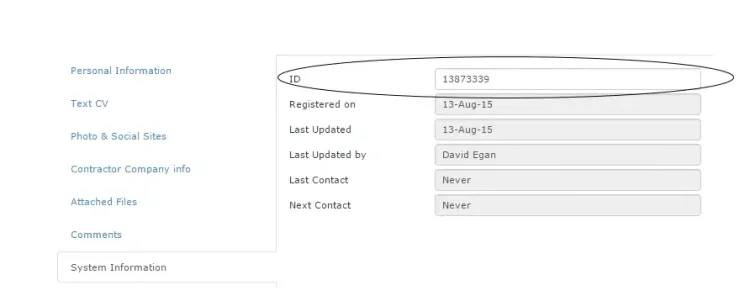
To merge records, you will need the “Contact ID” of the two records you wish to merge. This can be found in the records “System Information” section.
Simply, click on the ‘Help’ button in the top right-hand corner of Chameleon-i, and select the ‘Merge Records’ Option from the dropdown. You’ll see this screen:
Follow the on-screen instructions, and the two records will be merged, simple.
If you have any further feedback you would like Chameleon-i to consider, you can contact us directly on 01483 600370.